Most ML tutorials end at model.predict(). But in production,
the model is maybe 10% of the system. The other 90% is data
pipelines, feature engineering, serving infrastructure, monitoring, and
all the glue that keeps the thing running at 3 AM when something
breaks.
After 7+ years building ML systems at Amazon and EPAM — from 10B+ row data pipelines to real-time inference APIs — here are the system design patterns I keep coming back to.
The ML System Architecture Stack
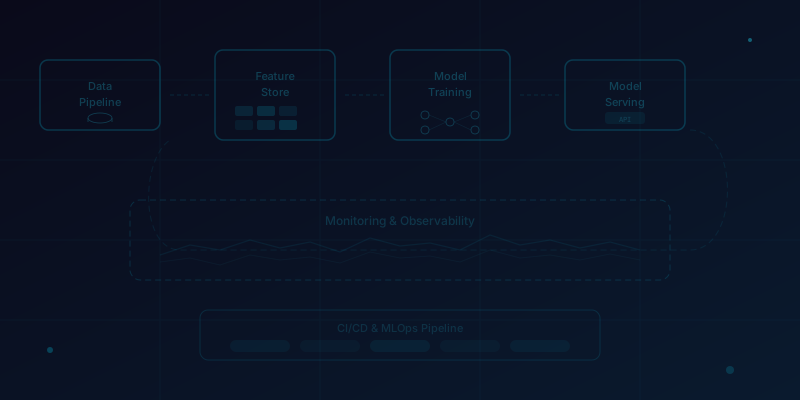
Every production ML system, regardless of the model, has the same five layers:
- Data Layer: Where features are sourced, stored, and versioned
- Training Layer: Where models are trained, tuned, and validated
- Registry Layer: Where models are versioned, compared, and promoted
- Serving Layer: Where models make predictions at low latency
- Monitoring Layer: Where you detect when everything goes wrong
Most teams nail the training layer (that's the fun part) and completely neglect monitoring. This is how you end up with a model that worked great in November and is quietly making terrible predictions by February.
Data Pipelines: The Foundation
At Amazon, we built pipelines that processed 10 billion+ rows from S3 through AWS Glue into Redshift. The architecture pattern that survived scale:
S3 (Raw Data)
  → AWS Glue ETL (PySpark)
    → S3 (Processed Parquet)
      → Redshift (Feature Tables)
        → SageMaker (Training)

Key design decisions:
- Partitioned by date for incremental processing
- Schema validation at ingestion (catch bad data early)
- Idempotent jobs (re-runnable without duplication)
- Separate raw/processed/feature zones in S3
The most important principle: idempotent pipelines. If a job fails halfway through, you should be able to re-run it from scratch without creating duplicate data or corrupted state. We achieved this with date-partitioned writes and atomic swap operations in Redshift.
Schema Evolution
Data schemas change. Source teams add columns, rename fields, change data types. If your pipeline assumes a fixed schema, it will break — guaranteed. We handled this with:
- Schema-on-read with validation: Parse the data you expect, raise alerts for unexpected changes, but don't fail on unknown columns.
- Data contracts: Formal agreements with upstream teams about what fields are guaranteed. Changes require a 2-week deprecation notice.
- Feature versioning: When a feature definition changes, create a v2 alongside v1. Don't overwrite — retrain the model on v2 and cut over cleanly.
Feature Engineering at Scale
Feature engineering is where most of the real model performance comes from. But feature engineering at scale introduces a unique challenge: training-serving skew.
"Training-serving skew is the #1 silent killer of ML systems. Your model trained on features computed in batch PySpark, but serving computes them in real-time Python. The subtle differences in implementation will degrade your model silently."
The solution: compute features once, serve everywhere. We used a feature store pattern where computed features were stored in a centralized table (Redshift for batch, Redis for real-time), and both training and serving read from the same source.
Model Training and Experimentation
At scale, model training is not a notebook activity. It's a pipeline:
- Data snapshot: Pin training data to a specific date range for reproducibility
- Feature computation: Generate features from the snapshot (not live data)
- Training: Train candidate model with logged hyperparameters
- Evaluation: Compare against current production model on holdout set
- Registration: If better, register in MLflow with metadata
- Approval: Human-in-the-loop review for critical models
We used SageMaker Training Jobs for compute-heavy training with spot instances (70% cost reduction). MLflow tracked every experiment — parameters, metrics, artifacts — so any model could be reproduced months later.
Model Serving Patterns
Batch Serving
For use cases that don't need real-time predictions (daily forecasts, weekly recommendations), batch serving is simpler and cheaper. Compute predictions on a schedule, store in a database, and let the application query pre-computed results.
Our workforce forecasting system at Amazon ran weekly batch predictions via Lambda → SageMaker Batch Transform → Redshift → QuickSight dashboard. No real-time inference needed, no latency concerns.
Real-Time Serving
For real-time needs (anomaly detection, damage classification), we used SageMaker Endpoints with autoscaling. Key considerations:
- Model size vs latency: A 500MB PyTorch model has a cold start problem. Quantize or distill for latency-critical paths.
- Batching: SageMaker supports server-side batching — collect requests over a short window and batch-process for GPU efficiency.
- Fallbacks: When the model endpoint is down, what happens? We always had a rule-based fallback that returned reasonable defaults.
- Shadow mode: Deploy new models in shadow mode — they receive production traffic but their predictions aren't used. Compare shadow vs production predictions to validate before cutover.
Monitoring: The Neglected Layer
Your model will degrade. It's not a question of if, but when. The patterns that fail can happen in two forms:
Data Drift
The distribution of input features changes over time. Customer behavior shifts, business conditions change, upstream data pipelines break subtly. We monitored feature distributions using population stability index (PSI) with alerts when any feature's PSI exceeded 0.2.
Model Drift
Even with stable inputs, the relationship between features and targets can shift. We tracked rolling prediction accuracy (MAPE for forecasting, AUC for classification) on a sliding window and set up automated retraining when performance dropped below threshold.
# Simplified monitoring pseudocode
for each model in production_models:
    recent_predictions = get_predictions(last_7_days)
    recent_actuals = get_actuals(last_7_days)

    current_metric = compute_metric(recent_predictions, recent_actuals)
    baseline_metric = model.baseline_metric

    if current_metric < baseline_metric * 0.85:  # 15% degradation
        trigger_alert(model, current_metric, baseline_metric)
        if auto_retrain_enabled:
            trigger_retraining_pipeline(model)
Cost Optimization
ML infrastructure costs can spiral quickly. Patterns that saved us significant budget:
- Spot instances for training: 70% cheaper, with checkpointing to handle interruptions. SageMaker Managed Spot Training handles this natively.
- Right-sized endpoints: A linear regression doesn't need a ml.p3.2xlarge. Start with CPU instances and only use GPU for models that need it.
- Autoscaling: Scale inference endpoints to zero during off-hours. Our anomaly detection system scaled from 2 instances during business hours to 0 at night.
- Model compression: Quantization and distillation for serving. Our CNN damage detection model was 4x smaller after INT8 quantization with negligible accuracy loss.
The Pattern I Keep Coming Back To
After building ML systems at multiple companies and scales, the pattern that works is boringly consistent:
- Start with a simple model and a robust pipeline
- Get it to production fast (even if accuracy is mediocre)
- Instrument everything — monitoring, logging, alerting
- Iterate on model quality once the system is stable
- Automate retraining when you trust the pipeline
"Shipping a mediocre model in a robust system beats a perfect model in a notebook. You can always improve the model — but you can't improve a system that doesn't exist."
Conclusion
ML system design is infrastructure engineering with a statistical component — not the other way around. The teams that succeed are the ones that invest as heavily in pipelines, monitoring, and serving as they do in model development. The model is important, but the system is what delivers value.
If you're building ML systems and want to discuss architecture patterns, reach out — I love talking about this stuff.